Vibe to viable fundamentals
The engineering fundamentals to know, and the six questions we’d ask before a vibe-coded app goes live.
At the end of September, UnMute hosted an AI mixer for a room of AI builders and champions. As part of the evening, Stephanie Siaw, UnMute's technical partner and co-founder of PO2 Studio, ran a workshop on the engineering fundamentals to know to help you get from a vibe coded app to a viable, scalable product.
This post goes through the six questions the workshop covered, with the slides, prompts and exercises from the workshop so you can work through your own app as you read.
read the rest, free
Enter your email to unlock the article. You will also get the AI Builder's Newsletter, practical notes on building & shipping products with AI from the team at PO2 Studio.
No payment, no card, nothing else to fill in. Unsubscribe any time.
By continuing you agree to receive the PO2 newsletter. We use your email for that and nothing else. Privacy policy.
Why it matters
AI is now the great democratiser when it comes to coding. Almost anyone can get a working prototype in an afternoon, and while you are prototyping that is exactly the right approach: Move fast, break things, find out whether anyone wants it.
Claude in particular is great at “one-shotting” an idea if you don’t have any specific specifications to follow, and the cost of seeing what it comes up with is very low. However, when you actually want to take that app to production, it’s important to know the engineering basics, as there are many things AI won’t do out of the box unless asked.
This workshop covers six of these fundamentals. Each is something a seasoned engineering team makes sure to consider, and something a vibe-coded app may not.
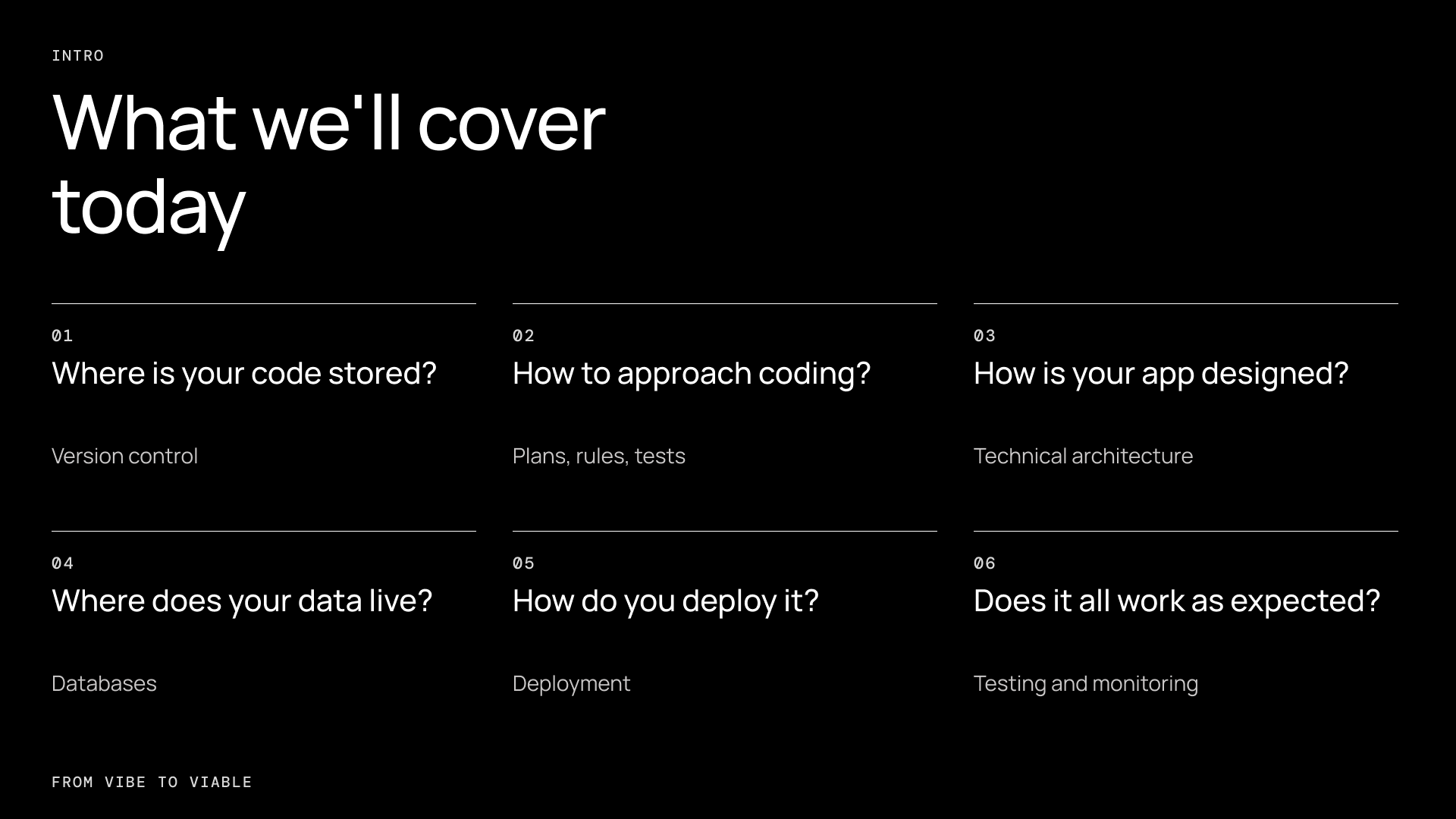
1. Where is your code stored?
The problem this solves: You made a change and now everything is broken. Can you go back to exactly how it was?
By default, AI will give you everything in one downloadable file, but it won’t store it in Git unless asked. Git is a save history for your code. Every commit is a snapshot you can go back to.
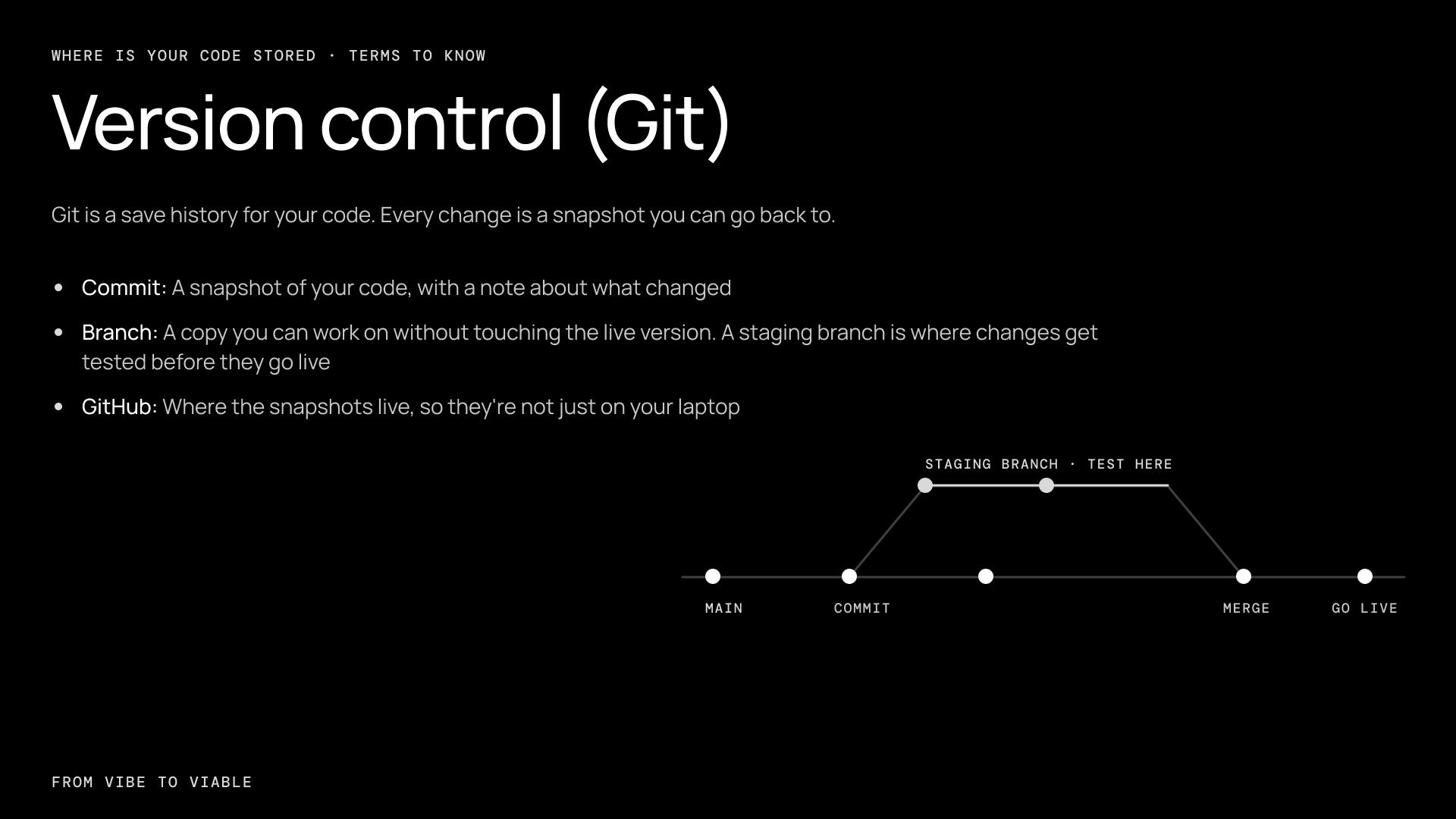
You do not need to learn the commands. Create a GitHub account, connect your tool or agent to it before you build anything, then ask the agent to commit after every working change. When something breaks, ask it to go back to the last working version.
Ask your AI:
"Check that Git is set up and connected to GitHub. From now on, commit after every working change with a short description of what changed."
2. How do you approach coding?
"Build me a booking app" gives you something that looks right. Whether it holds up when you start using it is another matter.
These three approaches can be helpful when coding with AI to ensure that the app works well under the hood:
Plan before you build. Break big features into issues, and ask for a step-by-step implementation plan for each issue. Make the AI list its assumptions, and review the plan rather than just the code produced. It is far cheaper to catch a wrong turn there.
Give the AI rules. A rules file such as CLAUDE.md or .cursorrules tells it what the app does, how the code is organised, what not to touch and how to test, so you stop repeating yourself every session. Don’t be too prescriptive however, only put the minimum needed here.
Test first. A test is a tiny program that checks that your app does what it says. Set up test-driven development and make it part of coding so the AI cannot break things without you knowing, and start with the areas that are riskiest to break: Login, payments, saving data, etc.
Think about: The five things a user does most in your app. For example, for a booking app, it might be sign up, book a class, pay, get a confirmation, cancel. Those are the flows that need tests around them.
Ask your AI:
"Do we have any tests set up? If not, set up a test runner and write tests for the most important flows. Then add a rule to our rules file: for any core logic, write the tests alongside the code, and run them before you tell me something is done."
3. How is your app put together?
If you don’t know how your app is put together, you won’t be able to tell if AI is building it wrong. Here are the basics to know about your app architecture:
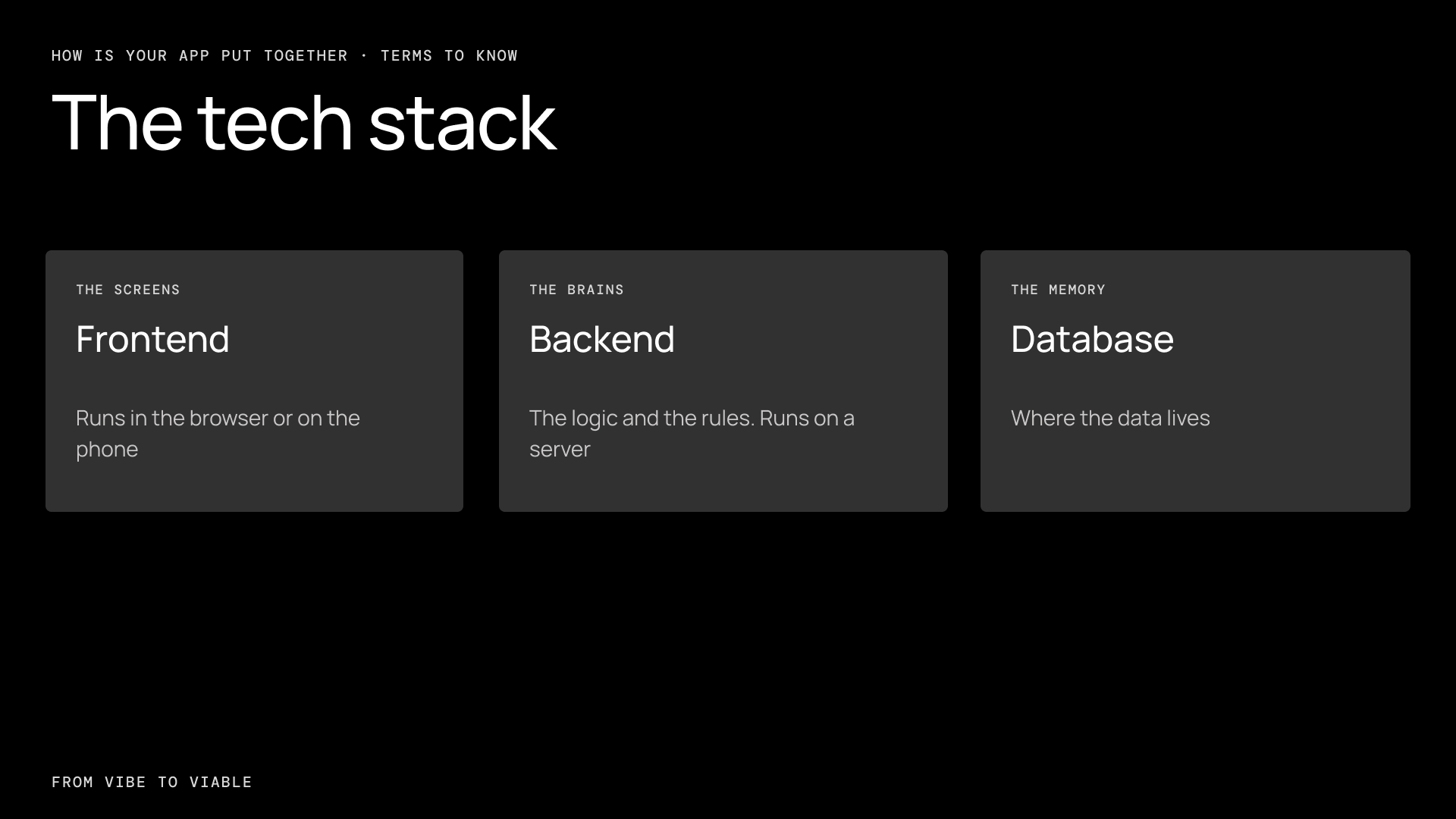
The frontend is what people see and tap. It runs on their device, in the browser or in an app on their phone. Anything in the frontend can be read by anyone using it, so it shouldn’t hold secrets or complicated logic.
The backend is where the rules live. It runs on a server you control. It should check who someone is and what they are allowed to do. It’s the place to take payments, talk to outside services and hold your secret keys.
The database is where the data lives. In most apps, the frontend asks the backend, and the backend talks to the database. Some apps let the frontend talk to the database directly. If yours does this, its access rules have to be set up properly.
Unless you ask, AI tools tend to build all of this in one place. The pricing logic ends up inside a button, the database is queried straight from the page, and an API key sits in code that anyone can open. It works in the demo. It stops working when someone opens their browser tools and changes the price.
Keeping the frontend and backend separate fixes that. The rules sit where users cannot touch them. One backend can later serve a website, a mobile app and your own internal tools. Each side can change without breaking the other.
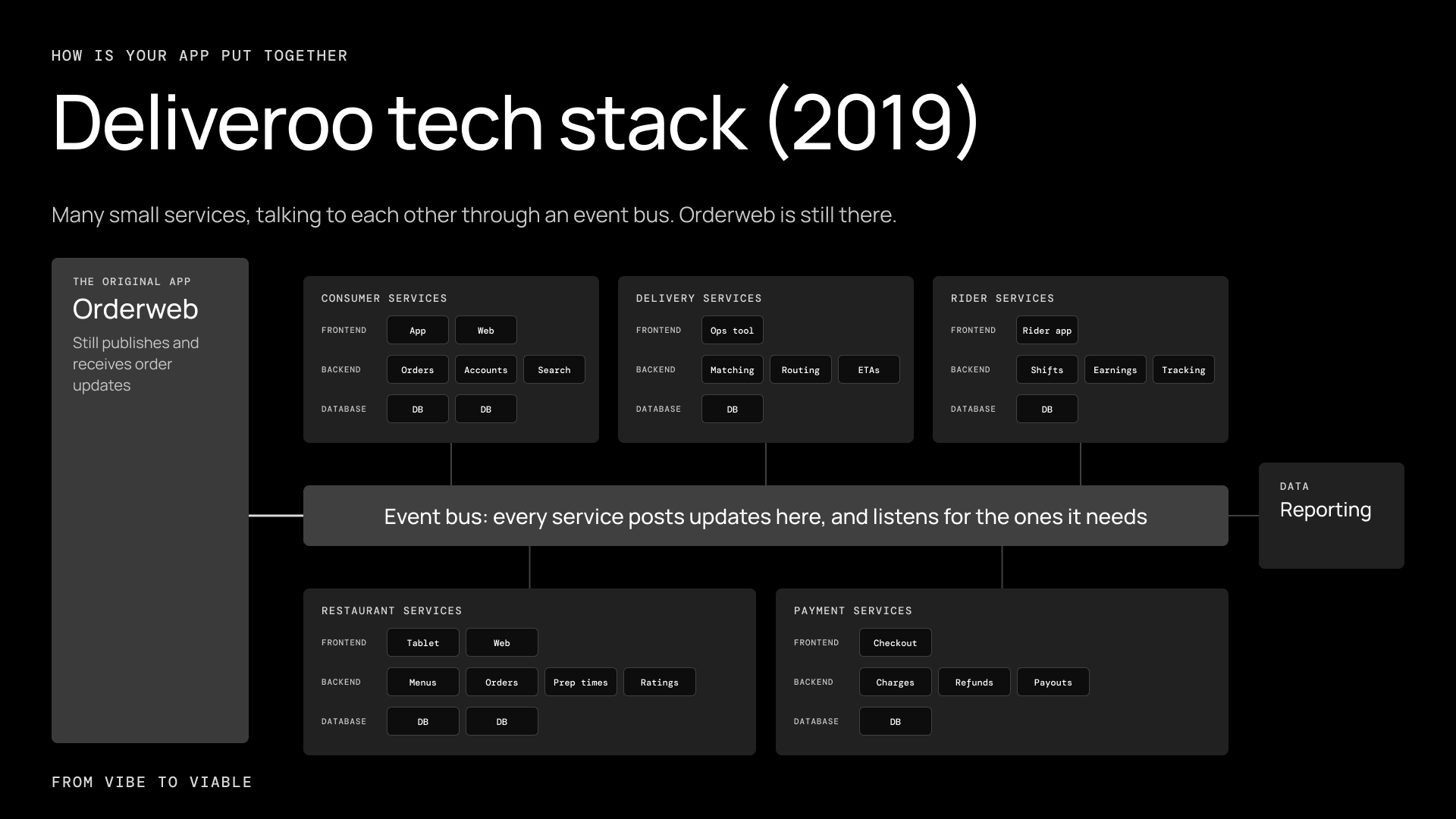
Splitting the backend into many small services, called microservices, is the next step after that. However, splitting services is another thing to deploy, monitor and keep in step with the others.
Deliveroo ran on one main app for years.
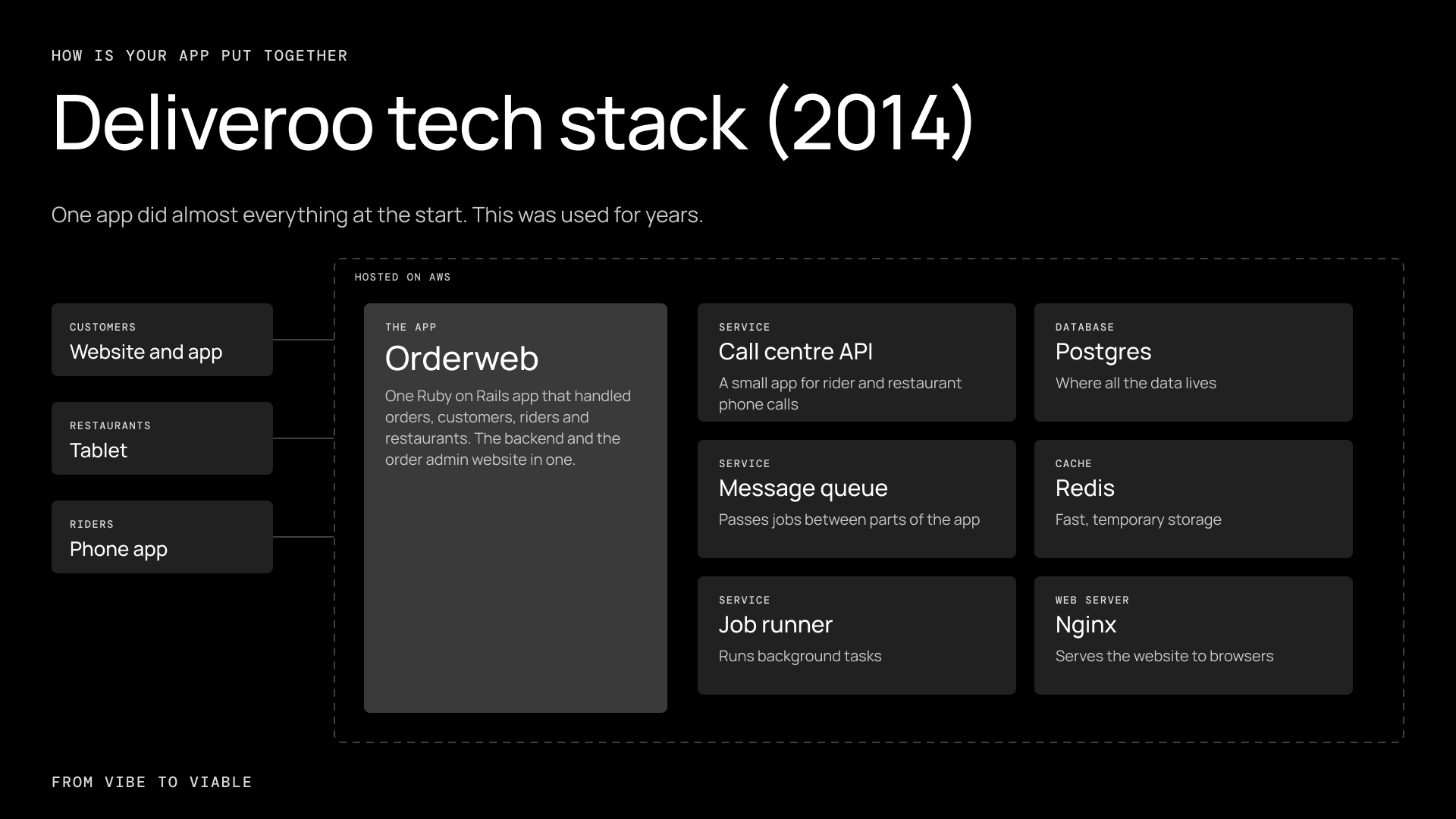
It split into many services later, when many engineering teams needed to work on them at the same time without getting in each other’s way.
Ask your AI:
“Draw my app’s architecture as a diagram: frontend, backend, database and any outside services. Explain what each part does in plain English. Then tell me where the business logic and secret keys live, and whether anything that should run on the server is running in the browser.”
If the frontend and backend are mixed together, follow up with:
“Give me a plan to separate the frontend from the backend, one step at a time. Don’t change any code until I’ve approved the plan.”
In terms of security, these are some of the more common issues we see with vibe coded apps:
Secrets do not go in the code. API keys are passwords. Keep them in environment variables, never in a repo on GitHub. This is one of the biggest security holes we find in audits, and most of the time the AI will not do it until told.
Ask your AI:
"Search the whole project, including the Git history, for hardcoded API keys, passwords or tokens. List every one you find and where it is. Then move them to environment variables and tell me which keys I need to rotate."
Don’t let AI build your login. Use an auth provider such as Clerk, Auth0 or Better Auth. They handle passwords, resets and sessions for you, and protect against common attacks. AI will happily write a login form that stores passwords insecurely.
Check authorization on the server. Every time the app reads or changes data, it should check whether this user is allowed to touch this record. AI-built apps often check on the screen but not on the server, so anyone who knows the URL can see everyone's data.
Ask your AI:
"Review this app for security gaps, starting with authentication and authorization: where do we check who the user is, and where do we check what they're allowed to see or change? Then go through the OWASP Top 10. List each issue, how serious it is, and where it is, before changing anything."
4. Where does your data live?
Data is one of the things that is harder to rebuild once you start storing it, so get the database design right early before you have users.
A relational database such as Postgres is the right answer 90% of the time. This is used for data that can be modeled into tables with rows and columns. There are other types of databases like graph databases, which social networks like Facebook use. If you have a more complicated data structure, ask AI what database it would recommend using. Remember that files such as images and PDFs go in file storage, not the database, which only keeps a link to them.
Remember to turn on automatic backups, and make sure data can be reliably restored. And never change your tables by hand: Make sure your agent does this by writing migrations, so the change is repeatable and reversible.
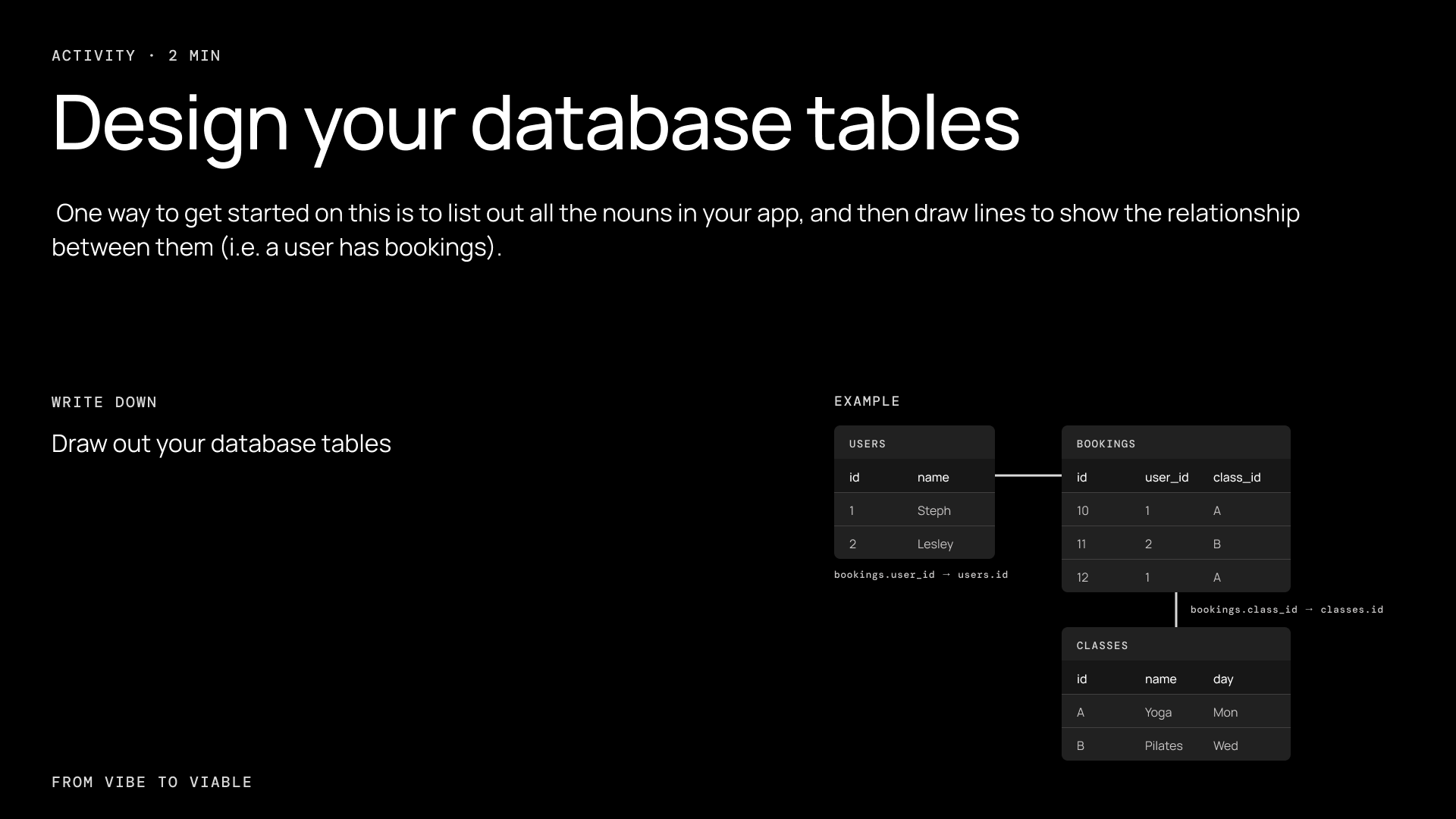
Think about your database tables: List every noun in your app, give each one a table, then draw lines for the relationships. For example, a user has bookings. A booking belongs to a class. A class has a name, a description and a price.
5. How do you deploy it?
It works on your laptop. Now it needs to work for everyone.
Start with a hosting platform that does the hard parts for you, such as Vercel or Railway. Deploy in a few clicks: this is the cheapest way to start with very little to manage. Move to a cloud provider like AWS, Google Cloud or Azure only when you have a real reason: compliance, scale, a specific service that’s missing.
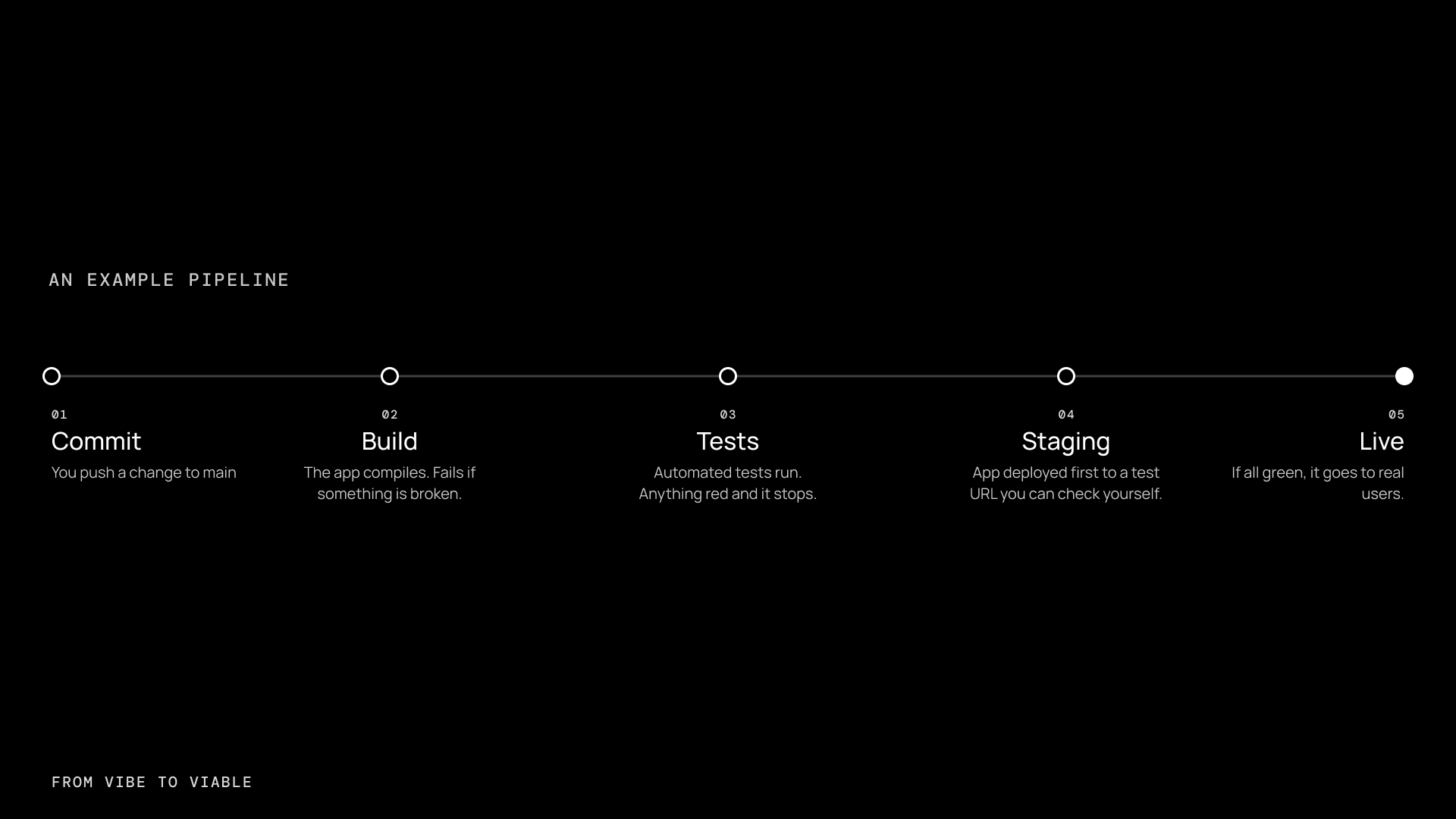
Then deploy on every change, with no manual steps. This is called a CI/CD (Continuous Integration / Continuous Deployment) pipeline. We recommend setting up a test (normally known as staging) URL connected to a staging branch, so that changes can be manually checked before it goes to your production URL.
6. Does it all work as expected?
You don’t want to find out your app is broken when a customer tells you. Instead, you should set things up so you find out before they do.
How do you do this? Test, test, test. Quality Assurance means trying to break your app on purpose, the way real people will by accident by deliberately testing all the edge cases: wrong inputs, empty fields, double-clicking, going back, slow internet.
Take your five main user flows from question two and, for each one, ask your AI:
"Act as a QA engineer. For the [booking] feature, list the edge cases a real user would hit: bad inputs, empty fields, double submits, going back mid-flow, slow or dropped connections. Then write a test for each one, run them, and show me which ones fail."
Additionally, set up monitoring and alerting in production. Error tracking platforms such as Sentry take an afternoon to set up and catch things you would never see. Logs will tell you why something broke, and alerts can be emailed to you when the site is down.
The production checklist
- Is my code in Git, backed up on GitHub or something similar?
- Does my coding AI work from a plan first, and run tests?
- Do I know what my app architecture is, and are my secrets out of the code?
- Is my data in a proper database with backups?
- Does every change deploy automatically after tests pass?
- Will I know when something breaks before my users do?
Think about: The one gap you will fix this week.
When to get help
Remember, you don’t need to do all of this yourself. You just need to know enough to know what is missing.
When may it be time to bring someone in? When you’ve proven your concept, and you have real customers, real money and real data. Maybe things are breaking, and you are scared to change anything. Maybe you need to scale, or the user experience or design needs to be better than you can get on your own.
If that sounds like you, come to a PO2 Academy workshop, or get in touch and we’ll take a look.